ERP vs. inventory management: differences, pros, cons.
An inventory management system runs purchasing, stock and sales; an ERP adds finance and production. When the simpler system is enough, and when it is not.

microtech büro+ runs your purchasing from the order proposal to the supplier order. EazyStock calculates forecasts, safety stock and order proposals on your büro+ data, with service-level targets per item class instead of maintained minimum quantities. The connector writes approved proposals back to büro+ via the GraphQL API.
Yes. Our connector reads items, stock per warehouse, suppliers, sales documents and supplier orders via the büro+ GraphQL API and prepares them for EazyStock. It writes approved order proposals back to büro+.
Only to a limited extent. The order proposal works with stock, reservations, customer orders and the minimum and maximum quantity you maintain per warehouse. The microtech help describes no forecast from sales history and no safety stock based on a service level. An inventory optimisation like EazyStock adds that.
Access to the GraphQL API: an OAuth application with client credentials. According to microtech, the GraphQL interface requires büro+ Gen. 24 Enterprise, build 7076 or later.
Yes. Whatever your purchasing team approves in EazyStock, the connector writes back to büro+, where it becomes supplier orders.
Four points where the büro+ order proposal reaches its limits. With links into the microtech help (German) so you can read up yourself.
An item's warehouse record holds the minimum and maximum stock quantity. When stock falls below the minimum, the item appears in the order proposal. How high these values should be is your decision: the help describes no calculation from demand or lead time. With many items and several warehouses, maintaining these values becomes the actual planning work.
microtech help: warehouse, position / stock ↗The order quantity can include stock, reserved quantities, customer orders, incoming orders and the minimum quantity. That works well as long as the demand already exists as a document. The order proposal help describes no forecast from sales history with trend or seasonality. Demand nobody has ordered yet is only covered by the minimum quantity you set.
microtech help: order proposal ↗büro+ can include the lead time, primarily that of the standard supplier, when determining proposal quantities. How much buffer an item needs for fluctuating demand is not calculated by the order proposal according to the help: there is no service level or safety stock parameter. The buffer is whatever you put into the minimum quantity.
microtech help: order proposal, lead time ↗Per item and warehouse there is one minimum and one maximum quantity. The help describes no time-dependent values for season, promotion or project. Either you adjust the values several times a year, or you hold stock all year that is only needed in season. Both cost: working time or tied-up capital.
microtech help: warehouse, minimum and maximum stock quantity ↗Manual planning via maintained minimum quantities is error-prone. We know the pattern from many intro calls:
EazyStock computes on your büro+ data and answers the four problems above. Ordering stays in büro+.
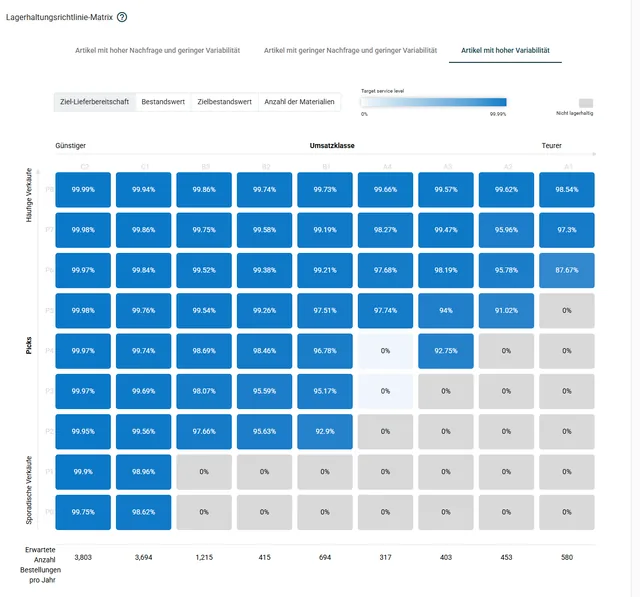
You set the target service level per item class; every night EazyStock calculates safety stock and reorder point per item and warehouse from it. If demand or lead time change, the values follow.
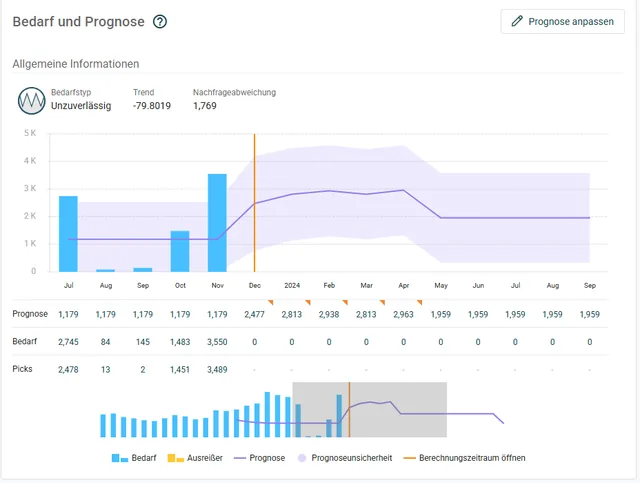
EazyStock picks the right forecasting method per item, accounts for trend and seasonality and cleanses outliers. It is based on your invoices and credit notes from büro+.
How much safety stock an item needs follows from demand fluctuation, lead time and the service-level target. Volatile items get more buffer, steady ones less.
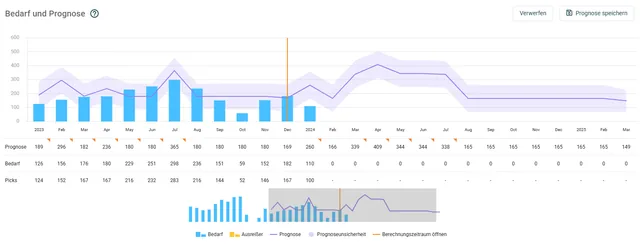
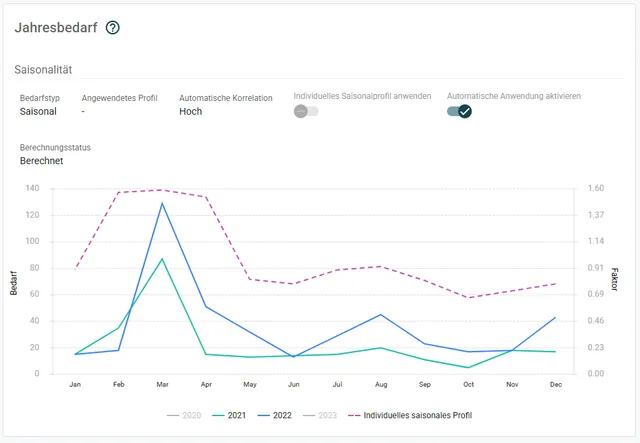
EazyStock detects seasonal patterns itself. You enter a planned promotion as a forecast adjustment, and the order proposals move with it before the shortage becomes visible.
With GraphQL, microtech provides a programming interface for büro+, authenticated via OAuth 2.0. That is exactly where we connect: the connector reads your data and writes approved order proposals back to büro+.
The microtech connector is our newest connector. It reads your data, EazyStock calculates forecasts, safety stock and order proposals on it, and whatever your purchasing team approves lands back in büro+. Ordering stays where your team works.
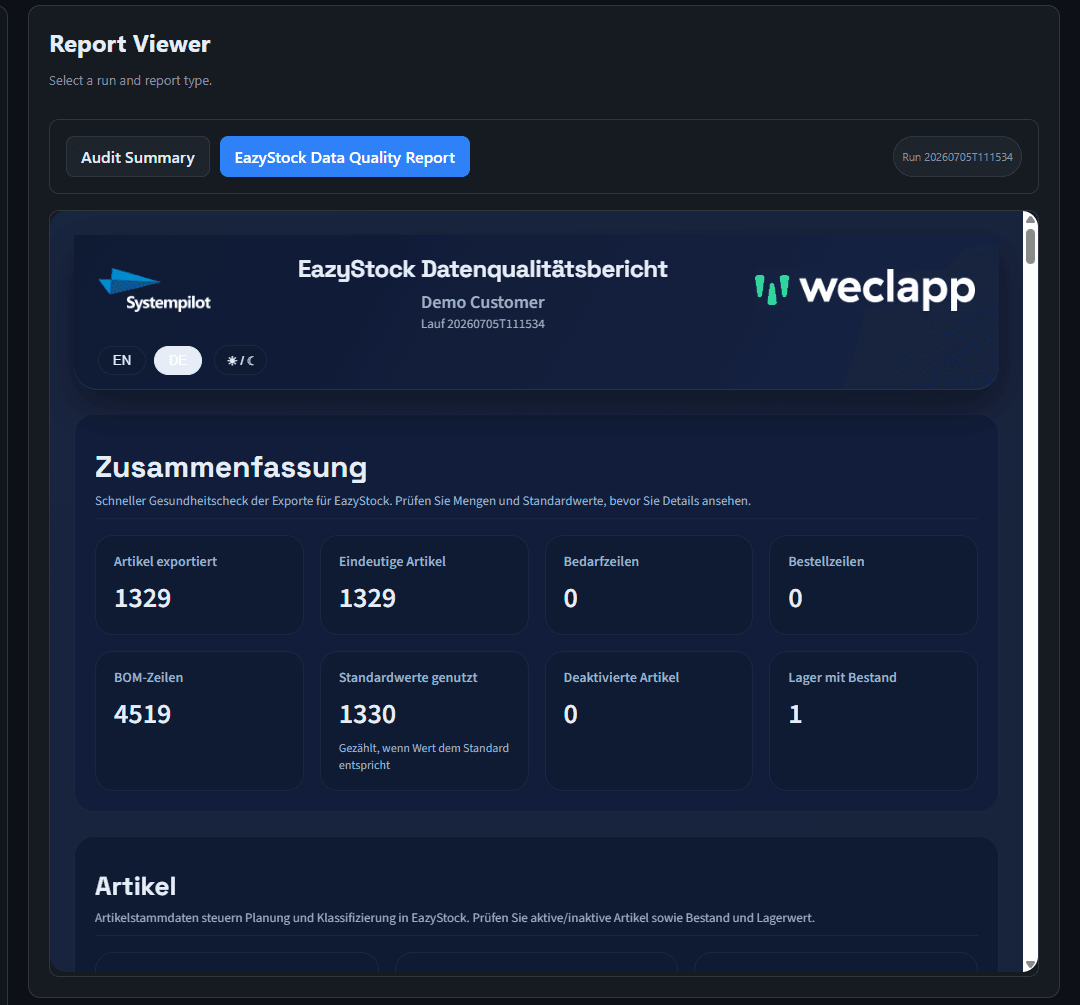
The connector runs in EazyConnect: the data from büro+ is checked and only handed over to EazyStock after approval. What each run has read is traceable.
How EazyConnect works in detail →What the büro+ order proposal calculates according to the microtech help, where it stops and what EazyStock adds on your büro+ data.
An inventory management system runs purchasing, stock and sales; an ERP adds finance and production. When the simpler system is enough, and when it is not.
Inventory optimisation runs in three steps: forecast demand, optimise parameters, execute orders. Why the order of these steps makes the difference.
Items with description, unit and product group, stock and reserved and available quantities per warehouse, the maintained minimum and maximum quantity, the preferred supplier with lead time, purchase price and minimum order quantity, invoices and credit notes as sales history, open sales orders and supplier orders. On the first run that is 36 months of history.
Yes. The connector writes approved order proposals back to büro+, where they become supplier orders. Your purchasing team reviews and approves in EazyStock; ordering continues in büro+.
The connector uses the GraphQL API. According to the microtech documentation, this requires an installed Gen. 24 Enterprise of microtech büro+, build 7076 or later.
An OAuth application with client credentials for the GraphQL API, possibly together with your microtech partner. We take care of mapping, test runs and ongoing operation.
According to the microtech help: if stock falls below the minimum quantity, büro+ proposes the difference between minimum quantity and stock. Reserved quantities, customer orders, incoming orders and lead time can be included, and a flag makes büro+ fill up to the warehouse's maximum quantity.
The microtech help on the order proposal does not describe this. The buffer is the minimum quantity you maintain per warehouse. EazyStock calculates safety stock and reorder point from forecast, lead time and target service level.
Yes. Minimum and maximum stock quantity are in the item's warehouse record. As soon as stock falls below the minimum, the item appears in the order proposal. The connector reads these values as well.
In the intro call we look at your assortment together and tell you honestly whether it pays off for you.
Arrange an intro call →